 Walid Karray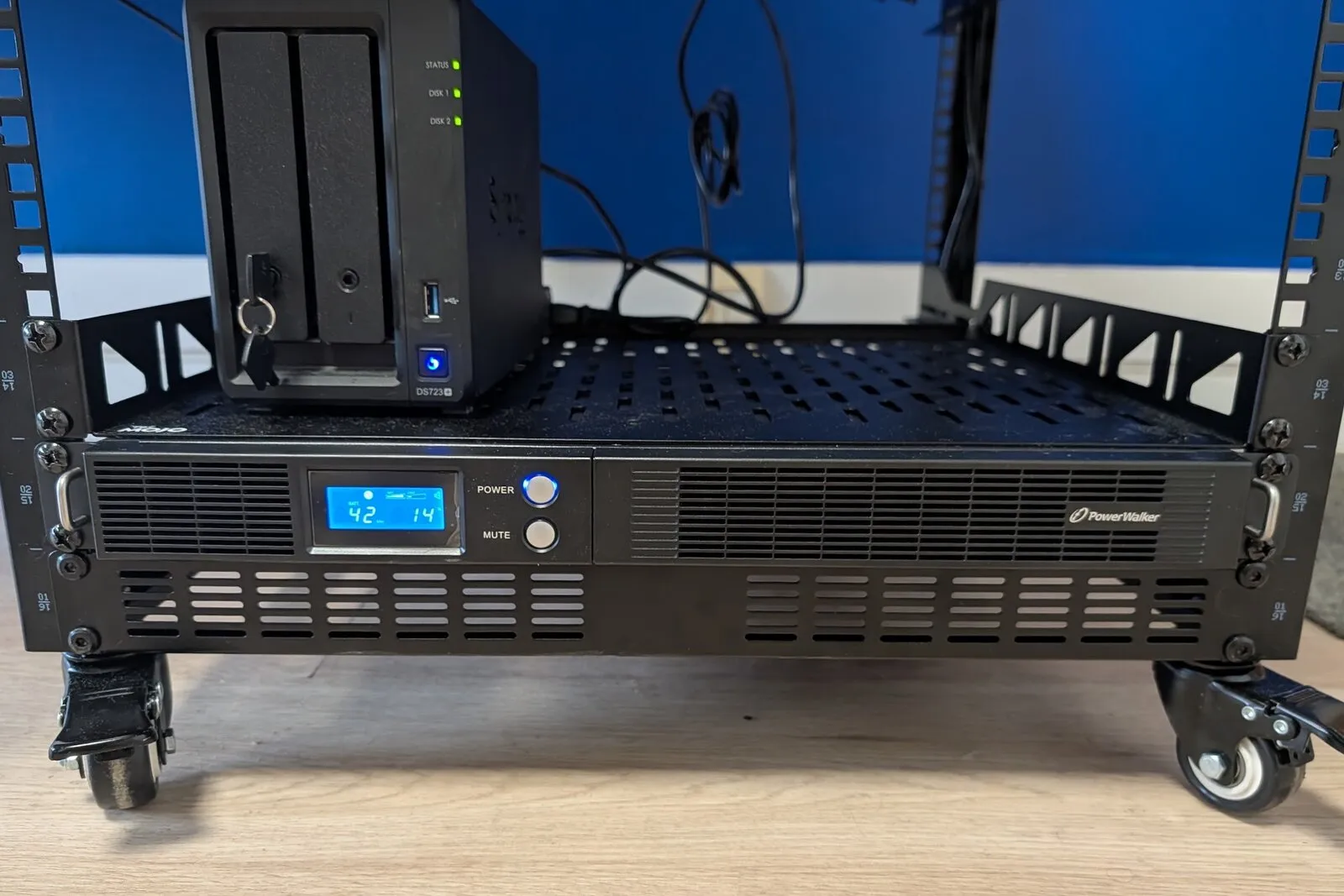
I plugged the UPS’s USB cable into the Proxmox host and set up NUT, the Network UPS Tools. It turns out the UPS reports several things that are simply not true, and one of them would have defeated the whole point of the exercise.
If you’re here for the fix: don’t let the UPS decide when the battery is low. Set ignorelb with your own charge and runtime thresholds, as in the config below, then run a full test to measure how long your shutdown really takes.
The setup: one UPS, one Proxmox host, one NAS
The UPS is a PowerWalker VI 750 R1U: 1U, line-interactive, 750 VA / 450 W, two 6 V 9 Ah lead-acid blocks inside. It feeds everything in the rack. The rack holds a ThinkCentre running Proxmox VE (the host is called pve), a Synology NAS, a switch, a small router, a Wi-Fi access point and an IP-KVM. All together they draw about 19% of the UPS’s capacity, around 85 W. The whole lab is described in How I Run My Homelab in 2026.
The plan is the classic NUT layout:
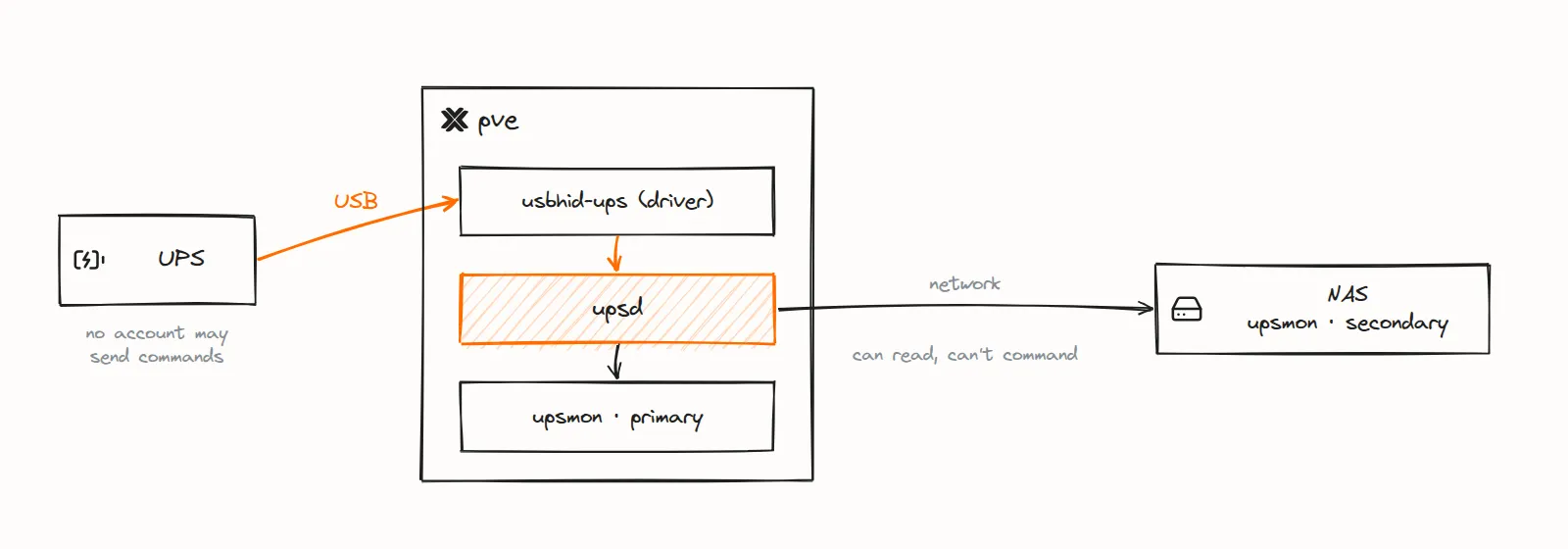
On low battery, pve’s upsmon raises the forced-shutdown flag (FSD), waits for the NAS to let go, shuts pve down (Proxmox asks every guest to shut down on the way; the two Talos VMs of the Kubernetes cluster get that request through their QEMU guest agent), and as its very last act tells the UPS to cut its outlets a little later.
The host runs Debian 13, which ships NUT 2.8.1. Everything is applied with Ansible, so the config below is what’s actually on the box.
What upsc gets wrong on this UPS
The first upsc ups looked fine at a glance. It took a second look to notice how much of it was wrong.
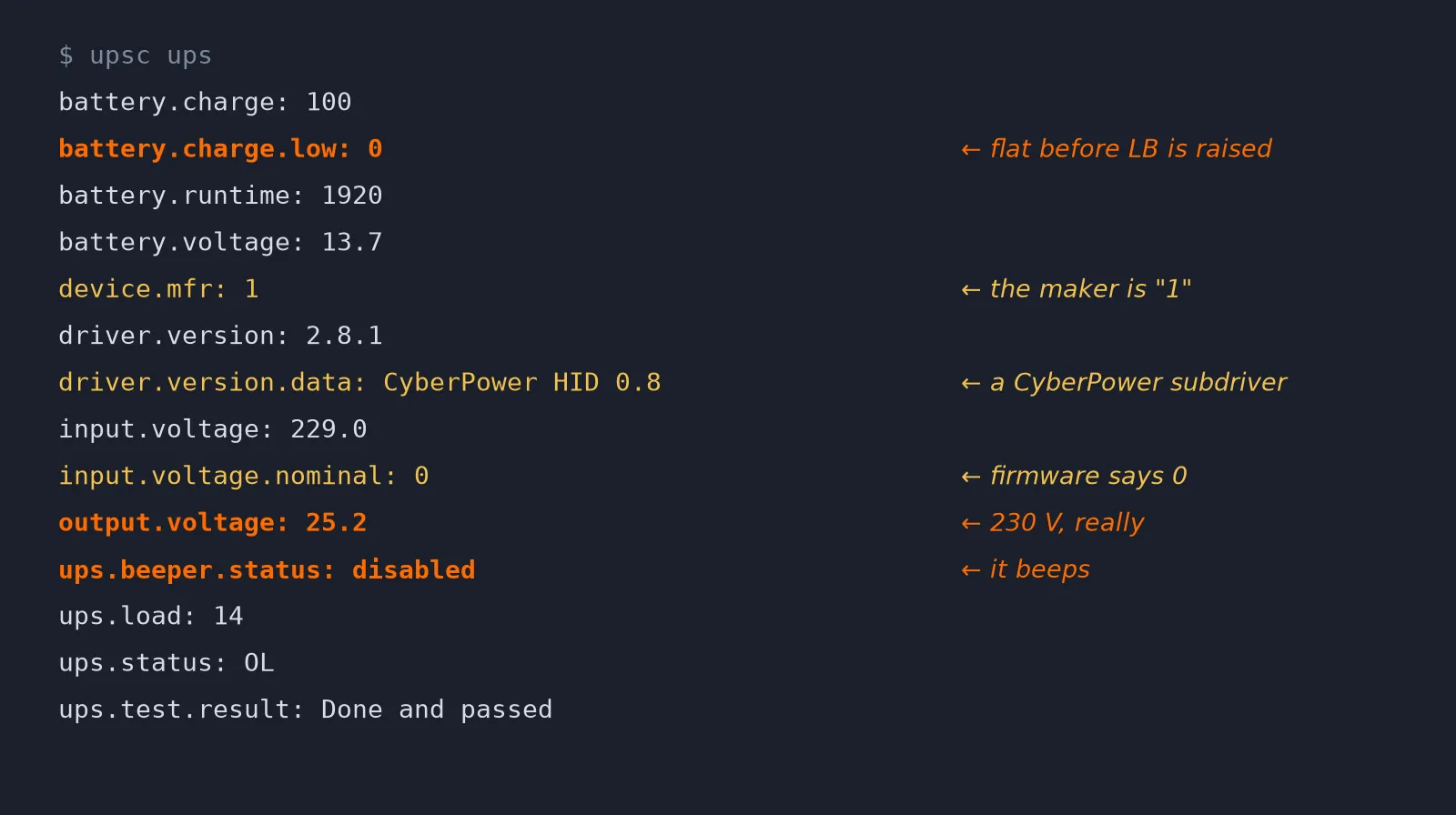
Going down the list:
output.voltage: 25.2. The UPS’s own display shows 230 V. This one turns out to be a known NUT bug for this family of devices. The USB vendor ID is 0764, which is CyberPower’s, so NUT picks its CyberPower subdriver, and that subdriver decodes this value wrong on this model, because of a bad range in the device’s HID descriptor. It was fixed upstream in nut#2718, in NUT 2.8.3. More on that below.
ups.beeper.status: disabled. It beeps. upscmd ups beeper.disable answers OK, and nothing happens. The only way to silence it is to hold MUTE on the front panel for three seconds. The variable is left out of monitoring.
input.voltage.nominal: 0 and device.mfr: 1. Harmless, just odd. I dumped the raw HID reports later, and the device really does send ConfigVoltage = 0, so that one is on the firmware, not on NUT.
battery.charge.low: 0. This is the one that matters.
Ignore the UPS low-battery flag and set your own
NUT’s whole shutdown logic hangs on one status flag, LB (low battery). When ups.status contains OB LB, on battery and low, upsmon starts the shutdown. By default usbhid-ups raises LB when the UPS’s own HID flags say so, and the threshold the UPS publishes for that is battery.charge.low.
This UPS says the threshold is zero. Taken at its word, it raises LB when the battery is already empty. Maybe the firmware has a voltage-based cutoff that would fire earlier; I didn’t want to find out during a real outage. In my one full test, Proxmox took more than three minutes to stop the guests (see below), the NAS needs its own time, and none of that happens on a battery that just hit 0%.
The fix is to stop trusting the UPS’s flag and let the driver compute its own:
# /etc/nut/ups.conf
[ups]
	driver = usbhid-ups
	port = auto
	vendorid = 0764
	productid = 0601
	desc = "PowerWalker VI 750 R1U"
	ignorelb
	override.battery.charge.low = 25
	override.battery.runtime.low = 300
	offdelay = 120
	ondelay = 180
With ignorelb, the driver ignores the device’s own LB and raises it itself as soon as battery.charge drops below battery.charge.low or battery.runtime drops below battery.runtime.low, whichever comes first. You can see it in the driver’s startup log:
using 'battery.charge' to set battery low state
using 'battery.runtime' to set battery low state
I set both thresholds on purpose, because battery.runtime on this unit jumps around. It’s computed from the instantaneous load, and in a homelab the load is never still: sitting on mains, it went from 3300 seconds down to 1080 and back within the same hour, every time a VM got busy and the load went from 15% to 24%. A runtime threshold alone would fire on a load spike, or too late after a quiet stretch. The charge reading moves much more smoothly. The 300-second runtime threshold is longer than the 3 min 40 s the shutdown took in the test below.
The full test: 3 min 40 s from the low-battery flag to power-off
Then I ran the full test: mains unplugged, nothing touched.
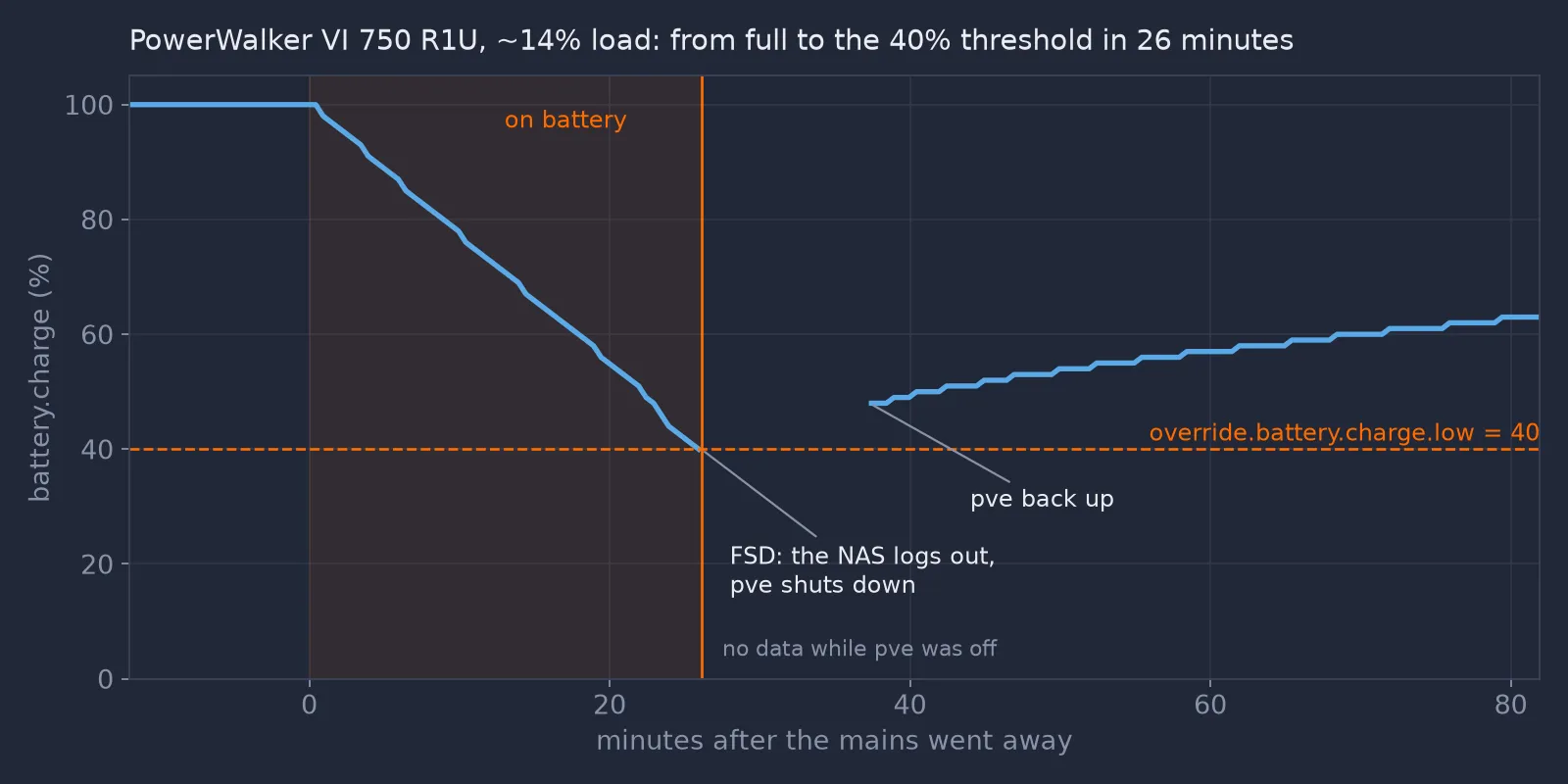
upsd through nut_exporter into Prometheus.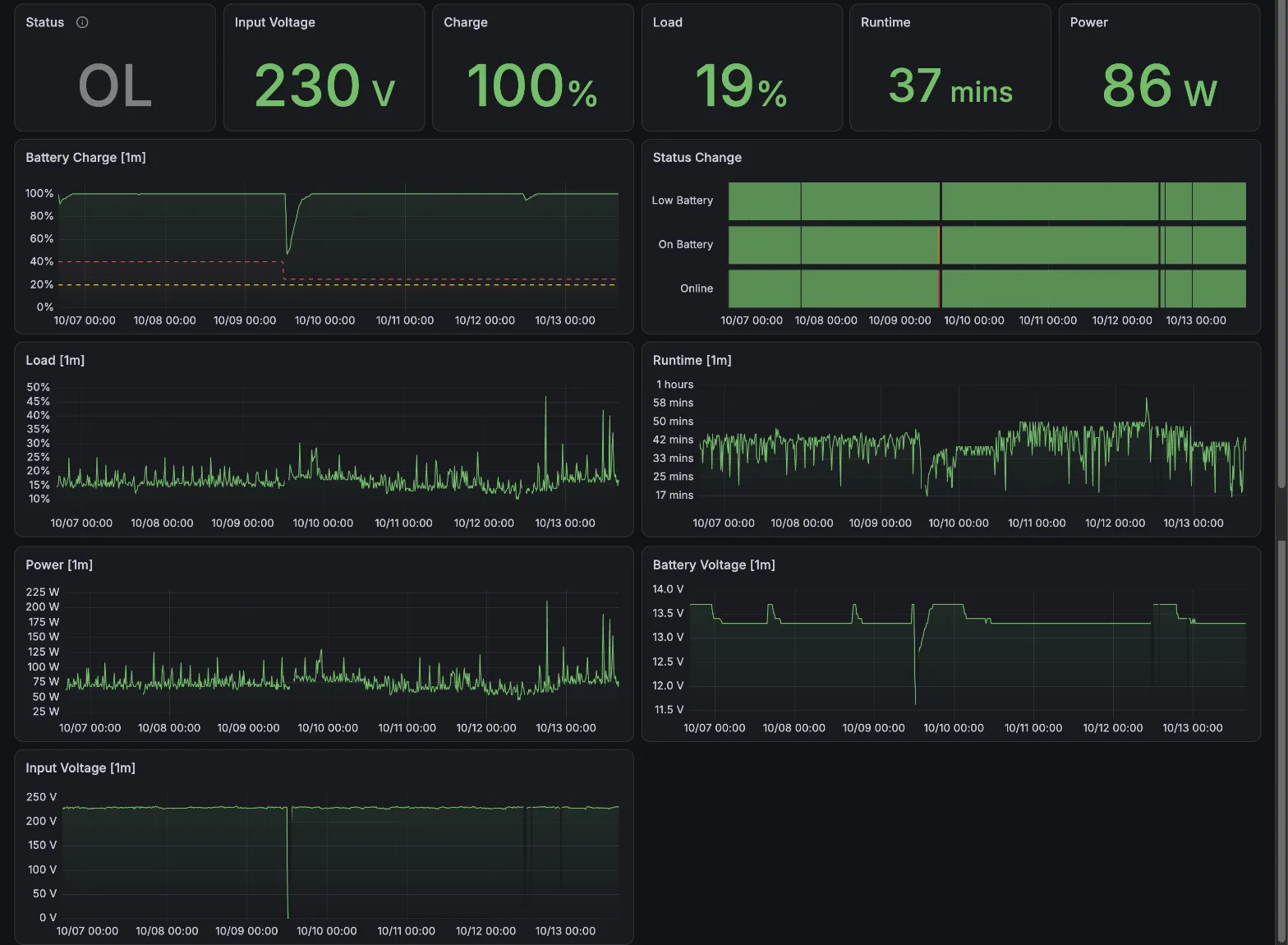
battery.charge.low, 25% today, and the yellow one the UPS’s own warning level, 20%.For this test, the charge threshold was set to 40%. The 25% it is set to now has not been through a full test yet. At about 60 W, the charge went from 100% to 40% in 26 minutes. Keep in mind that this percentage is estimated from the battery voltage, and under load the voltage sags, so 40% under load is not 40% of the real capacity left. It’s a reading, not a fuel gauge, which is one more reason to keep the margin wide.
At 40% the driver raised LB, and in the same second the NAS logged out, upsmon set FSD, and pve began shutting down:
13:34:09 User monuser@… logged out from UPS [ups]
13:34:09 Client [email protected] set FSD on UPS [ups]
13:34:09 Executing automatic power-fail shutdown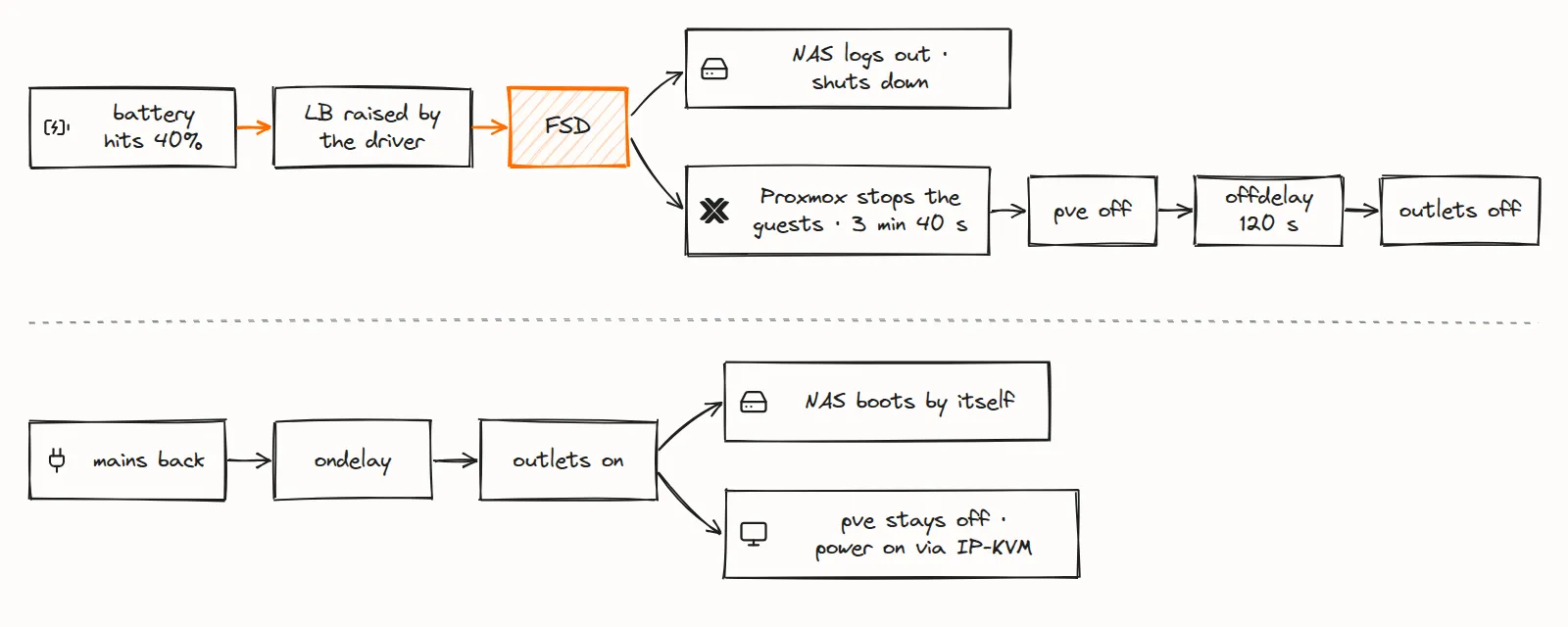
Then came the part I hadn’t measured before. Proxmox started stopping the guests at 13:34:17 and the last one was down at 13:37:34. The host powered off at 13:37:49: three minutes and forty seconds after FSD. That’s the real number the thresholds have to cover. It is one measurement, from one test. The cluster’s Talos VMs weren’t part of it and have never been through a power cut, so their shutdown time on battery is still to be measured.
offdelay doesn’t start at FSD. On Debian, the very last step of the shutdown is the nutshutdown hook in /lib/systemd/system-shutdown/, which sends the kill-power command to the UPS, and that’s when the 120 seconds start counting. So the outlets went dark two minutes after pve was off, and the NAS, which had started its own shutdown at 13:34:09, had close to six minutes in total.
When the mains came back, the UPS waited for ondelay and powered the outlets again. The NAS boots by itself when power returns. pve doesn’t: its firmware is set to stay in standby after an AC loss. That’s deliberate: I power it on with Wake-on-LAN from the IP-KVM. A power-on is a cold boot, so no guest starts until I unlock their encrypted storage. If you want yours to come back on its own, that’s the BIOS setting to change (“after power loss: power on” or similar), and without it the outlet cycling does nothing for that machine.
Once pve was back, the charge read 48%, higher than where it stopped. The battery didn’t recover anything: with the load gone, the voltage rose, and the estimate went up with it. It took several hours of charging to get back to full. And this kind of test isn’t free. Taking a lead-acid battery down to 40% wears it a little, so the full test is not a routine check; the quick test is.
This UPS counts offdelay and ondelay in whole minutes, so both are multiples of 60 seconds. ondelay must be longer than offdelay, so that the outlets are cycled even if the mains returns during the shutdown, and a machine that boots on AC return comes back.
Synology DSM as a NUT client: a hardcoded name and password
Synology’s DSM can act as a NUT client, but on its own terms. Under Control Panel → Hardware & Power → UPS, pick “Synology UPS server” (it means any NUT server), and give it the address of the host running upsd. DSM doesn’t ask for anything else, because it hardcodes the rest: the UPS must be named ups, and it logs in as monuser with the password secret.
So upsd.users on pve has exactly that:
[upsmon]
	password = <a real one>
	upsmon primary

[monuser]
	password = secret
	upsmon secondary
A public password feels wrong, but think about what the account can do: a secondary can read the UPS and be told to shut down. It can’t send commands or set the FSD flag. The account that can, upsmon on pve, has a real password. Even so, upsd only listens on localhost and on the lab’s own network (LISTEN in upsd.conf), not on every interface the host has.
No account can turn the outlets off
upscmd -l ups lists what this UPS accepts: battery tests, beeper commands (useless, see above), and load.off and shutdown.stayoff. The last two turn the outlets off. Everything in the rack, including the host that runs NUT, goes dark at once.
So no account in upsd.users has instcmds. When I do want to send a command, which in practice means the quick battery test, I add a throwaway account allowed to send that one command, send it, and remove the account in the same script, with a trap so the file is restored even if something fails:
CMD=test.battery.start.quick
P=$(head -c 18 /dev/urandom | base64 | tr -d "/+=")
cp /etc/nut/upsd.users /dev/shm/upsd.users.orig
trap 'cp /dev/shm/upsd.users.orig /etc/nut/upsd.users; rm -f /dev/shm/upsd.users.orig; systemctl reload nut-server' EXIT
printf '\n[once]\n\tpassword = %s\n\tinstcmds = %s\n' "$P" "$CMD" >> /etc/nut/upsd.users
systemctl reload nut-server
upscmd -u once -p "$P" ups "$CMD"
Thirty seconds later, upsc ups ups.test.result reads Done and passed. The quick test runs on mains and doesn’t drain anything. The deep test is a different matter: it drains the battery the lab would need if the power went out right after.
Two traps when you change the config
A live reload doesn’t change the thresholds. The driver supports a live reload, and it will happily tell you it completed one, but a live reload can’t change battery.charge.low or battery.runtime.low. The log says so if you look:
dstate_setflags: base variable (battery.charge.low) is immutable
dstate_setflags: base variable (battery.runtime.low) is immutable
Completed requested live reload of NUT driver configuration for [ups]: 0
The driver has to be restarted, and that has its own trap.
Restarting the driver on battery starts a shutdown. The day I set this up, I pulled the UPS’s mains plug to watch it switch to battery, and while it was unplugged I applied the next change with Ansible. That change restarted the driver. Here’s upsmon’s point of view:
08:32:25 UPS ups@localhost on battery
08:36:35 Poll UPS [ups@localhost] failed - Driver not connected
08:36:35 Communications with UPS ups@localhost lost
08:36:35 Client [email protected] set FSD on UPS [ups]
08:36:35 Executing automatic power-fail shutdown
08:36:35 Auto logout and shutdown proceeding
upsmon is doing exactly what it should. The last thing it knew was “on battery”, and now it can’t reach the UPS at all. On battery plus no news is treated as critical, because from where it sits the battery could be empty. So it started the shutdown.
What saved me was luck. As a primary, upsmon first waits for its secondaries to log out (HOSTSYNC, 15 seconds here) before it runs the shutdown command. One second into that wait, the next Ansible handlers restarted upsd and then upsmon. The upsd restart cleared the FSD flag, so the new upsmon had no idea that a shutdown had been started. If only upsmon had been restarted, it would have found FSD set on the server and shut the host down anyway. The host stayed up.
Nothing in the Ansible role guards against this: its handler restarts the driver, the server and the monitor whatever the UPS is doing.
Testing NUT 2.8.5, and a UPS that forgot its USB configuration
Since output.voltage was fixed upstream, I wanted to know whether a newer NUT would fix the rest. I ran the 2.8.5 driver against the UPS by hand and compared it with Debian’s 2.8.1:
output.voltage: 25.2 on 2.8.1, 230.0 on 2.8.5. The fix works on this unit.battery.chargecorrect on both. An old issue about this exact model reported it stuck at 50%; I couldn’t reproduce that.input.voltage.nominal: 0 on both. Firmware, as I said.battery.typeandbattery.mfr.datecame back empty on 2.8.5, where 2.8.1 hadPbAcid.
I posted these results on that issue, along with one side effect I hadn’t expected. After running the 2.8.5 driver once with debug on, the stock 2.8.1 driver couldn’t open the UPS anymore:
insufficient permissions on everythingThe device node was owned by root:nut as it should be, so it wasn’t permissions. The UPS had been left without an active USB configuration: bConfigurationValue was empty, and the kernel logged can't set config #1, error -71. A USB reset through sysfs didn’t help, and neither did usbreset. Writing the configuration back by hand did:
for d in /sys/bus/usb/devices/*; do
  [ "$(cat $d/idVendor 2>/dev/null)$(cat $d/idProduct 2>/dev/null)" = 07640601 ] \
    && echo 1 > $d/bConfigurationValue
done
systemctl reset-failed nut-driver@ups
systemctl restart nut-driver@ups
I haven’t figured out whether that’s the 2.8.5 driver’s exit path or this UPS’s USB firmware, and I said so on the issue. If your PowerWalker suddenly stops talking after you experiment with drivers, that’s the line to try before you start replugging cables.
For now pve stays on Debian’s 2.8.1. With output.voltage and the beeper status out of the exporter, there’s nothing 2.8.5 would fix that I actually use.
Icons in the diagrams: Simple Icons (CC0) and Lucide (ISC).